NEW Claude and Gemini Pro now on personal plans

Describe it. KIKA builds it.

A real code editor with an AI builder beside it. Tell KIKA what you want — it writes, edits and runs the code in a folder on your own computer, while you watch.

Free to start · Sign in with Google · v0.1.0
KIKA AI — brew-and-co
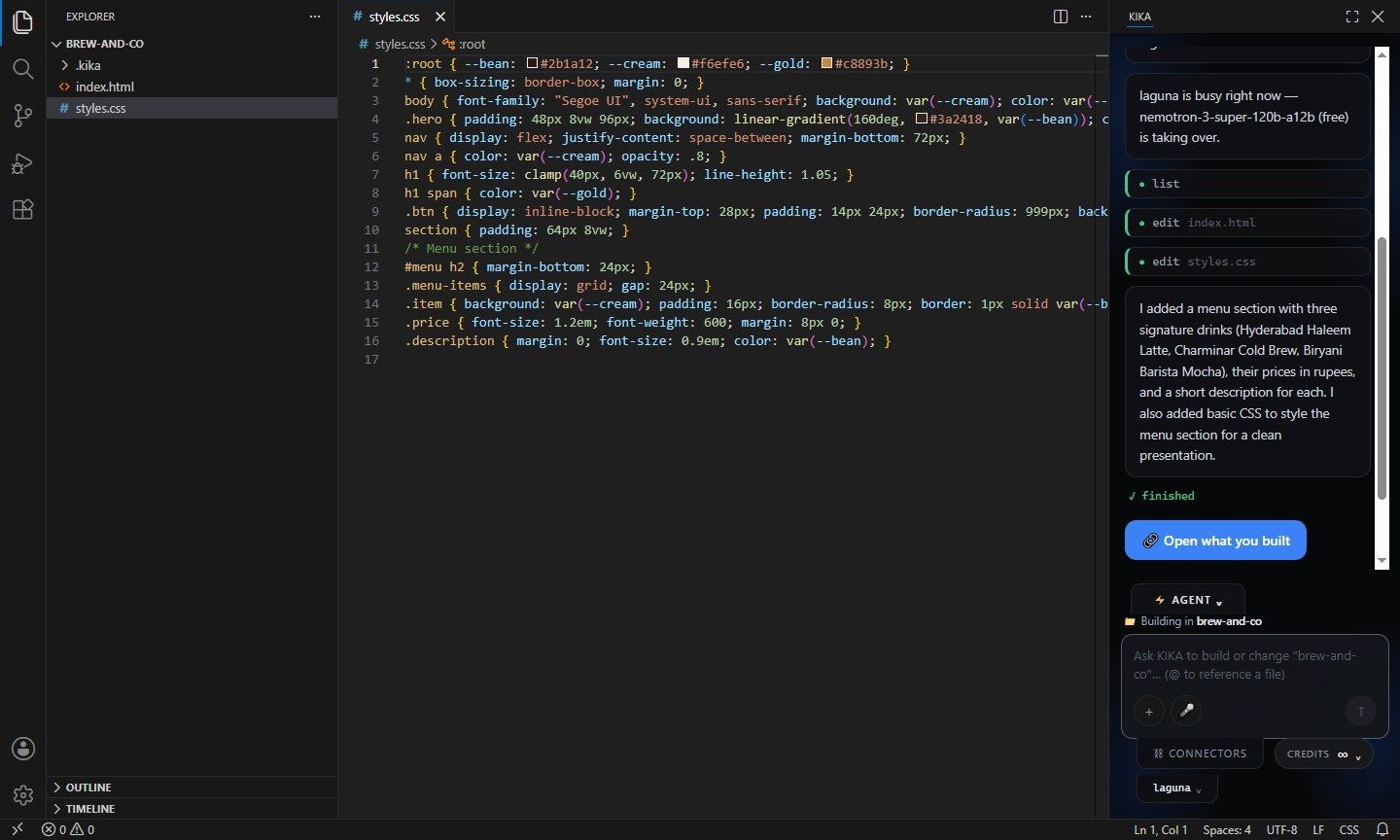
KIKA AI: the code editor on the left, and on the right the KIKA panel reporting the menu section it just added to a coffee shop website.

A real run: KIKA added a menu to a café website — the new styles are on the left, its summary on the right.

How it works

From a sentence to a working page.

No setup and no API keys. Open a folder, say what you want, and keep going.

1

Describe it

Type what you want in plain words, in the panel next to your code.

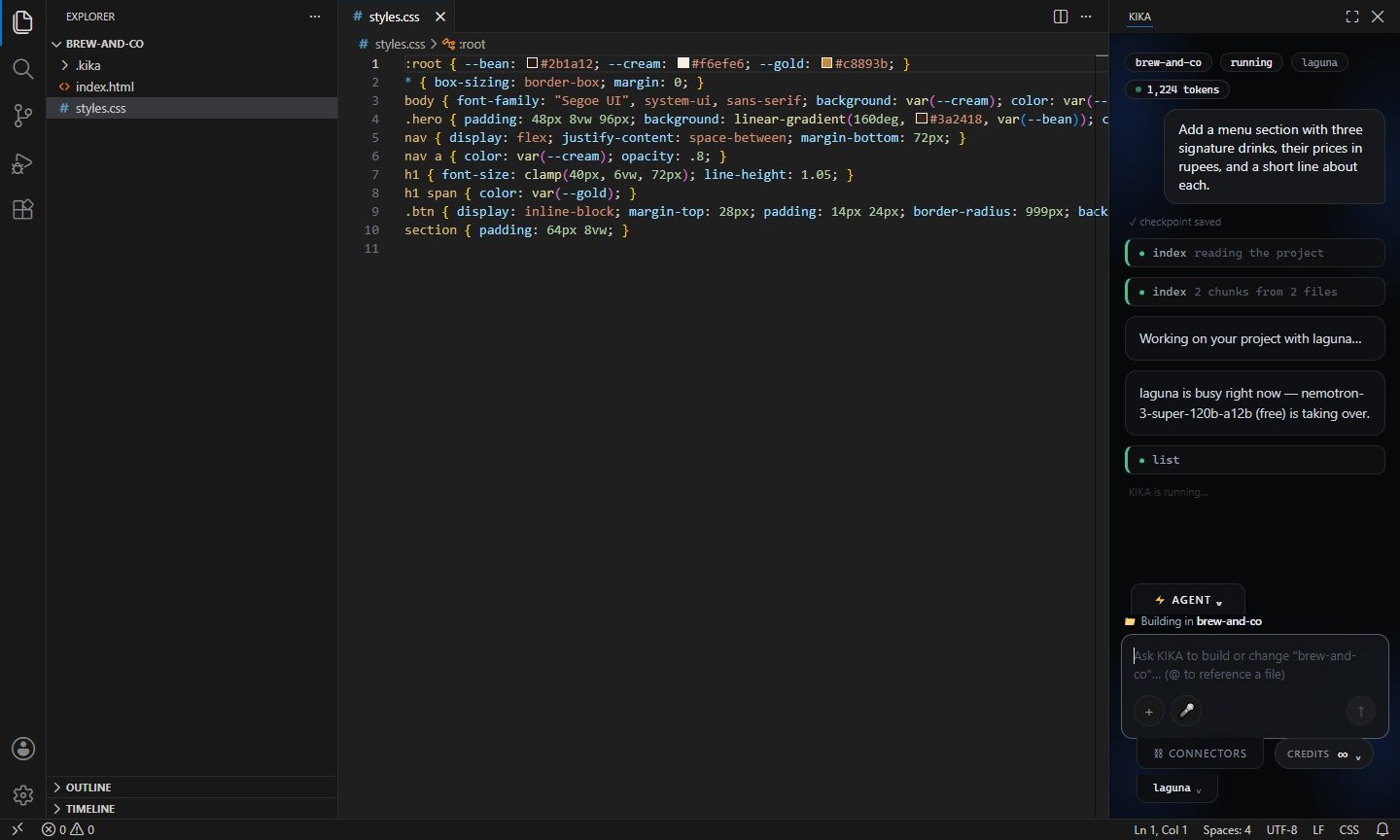
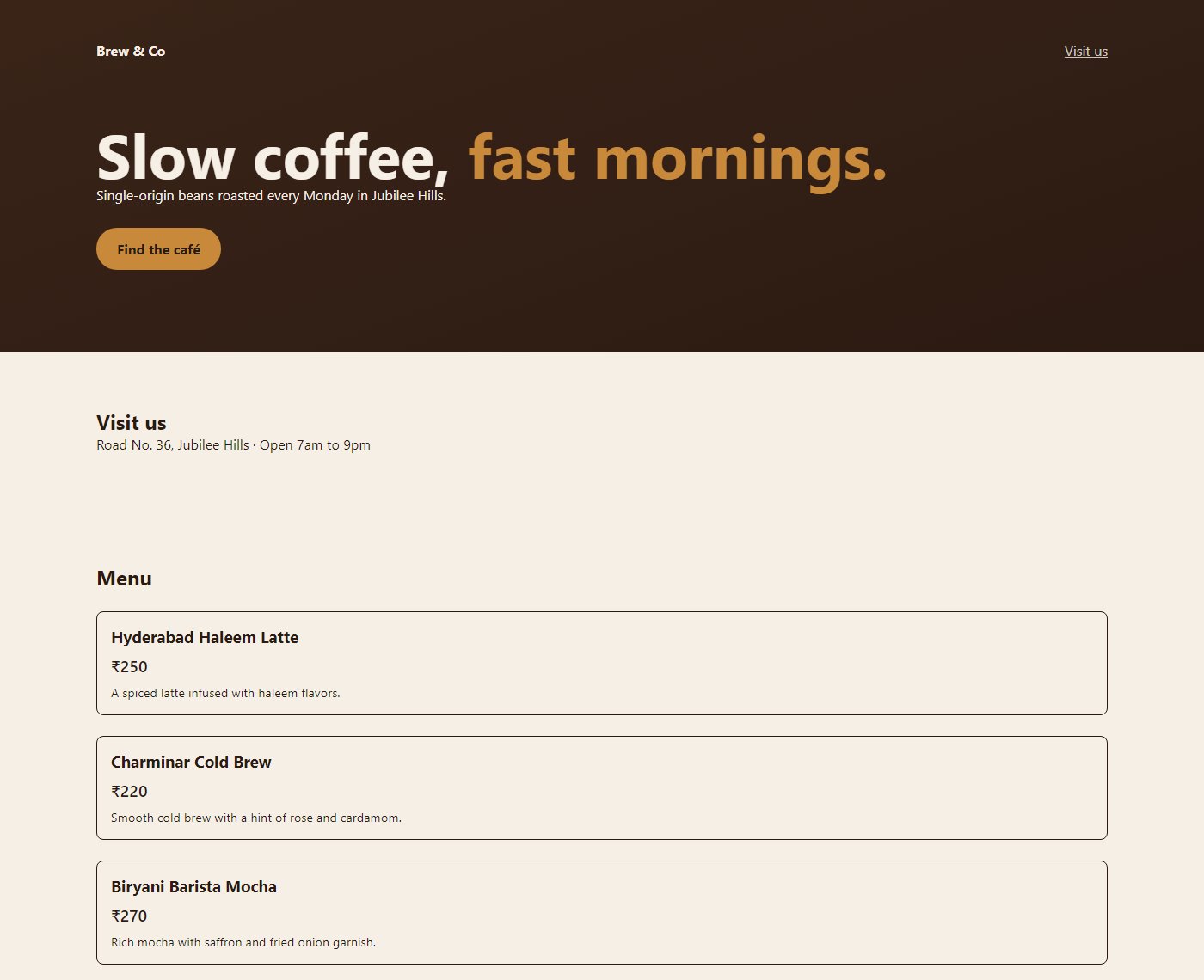
youAdd a menu section with three signature drinks, their prices in rupees, and a short line about each.
2

KIKA builds it

It reads your project, plans the change and edits the real files — you see every step.

The KIKA panel working on the request: checkpoint saved, reading the project.
3

It's yours

The result is ordinary code in your folder. Run it, change it, ship it.

The finished café page with a menu of three drinks and their prices.
What you get

An editor and a builder,
in one window.

Built on VS Code. KIKA sits right beside your code.

All the editor you already know — files, tabs, search, terminal, extensions — with KIKA's prompt box open on the right. Switch to the full KIKA view from the title bar or with Ctrl+Alt+K.

  • Builds in the folder you have open
  • A checkpoint before every change, so you can undo
  • Shows exactly which files it touched

KIKA AI
KIKA AI editor with the KIKA panel

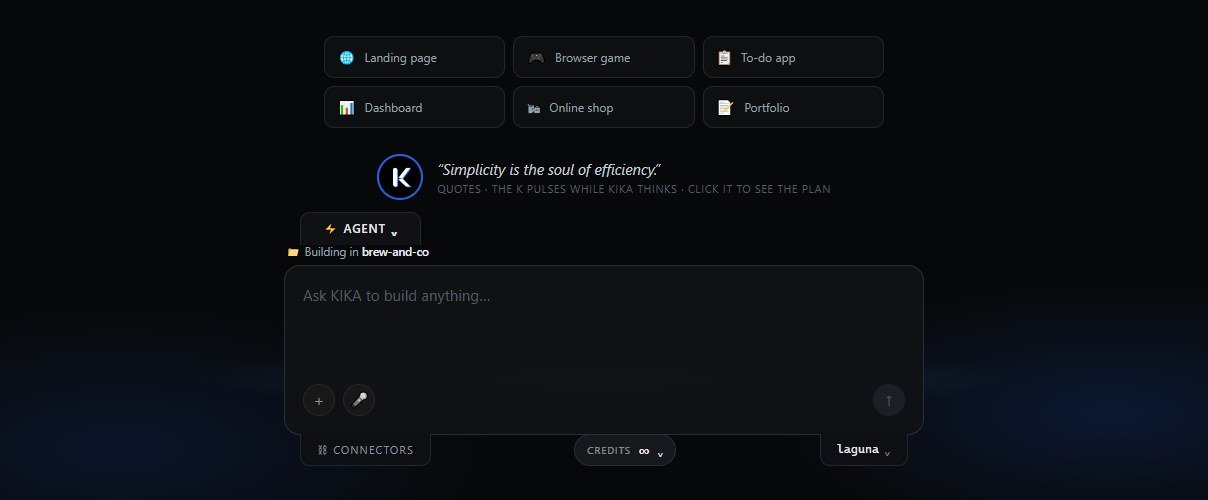
Start anything from one box.

Landing pages, browser games, dashboards, online shops — pick a starting point or just type. Free models are ready the moment you sign in; Claude and Gemini Pro unlock with a plan.

  • Free models included — no credit card
  • Claude and Gemini Pro on Pro, Mega and Studio
  • Bring your own API keys if you prefer
KIKA
The full KIKA view: starting points like Landing page, Browser game, To-do app, Dashboard, Online shop and Portfolio above the prompt box.
⚡

Agent mode

KIKA plans, edits and checks its own work across several files, not just one snippet.

🐞

Bugbot

One click reviews your project for logic errors and the edge case you forgot.

⏰

Automations

Schedule an agent to run on its own and read what it did later.

⧉

Connectors

Push to GitHub and deploy to Vercel from the panel.

🔒

Your files stay yours

Projects live on your drive. Only what a request needs goes to the model you picked — KIKA's cloud keeps none of it.

◆

Fair credits

1 credit = $0.06 of real AI cost, measured per request. Free models never use credits.

Pricing

Free to start. Pay for the premium models.

Every plan includes the full app. Paid plans add Claude and Gemini Pro — prices in ₹ for 30 days.

Free
₹0
Free models
  • Gemini Flash and open models
  • Editor, agents and Bugbot
  • Unlimited projects
Pro POPULAR
₹3,000 / 30 days
300 credits
  • Claude and Gemini Pro
  • Everything in Free
  • Unused credits stay yours
Get Pro
Mega
₹24,000 / 30 days
2,900 credits
  • Everything in Pro
  • About ten times the runway
  • For long agent runs
Get Mega
Studio
₹6,00,000 / 30 days
60,000 credits
  • Everything in Mega
  • Twenty times the Mega runway
  • Direct line for support
Get Studio

Buy and manage your plan on your account page with the same Google account you use in KIKA. Paid through Razorpay — card, UPI or netbanking.

For companies

One pool of credits for your whole team.

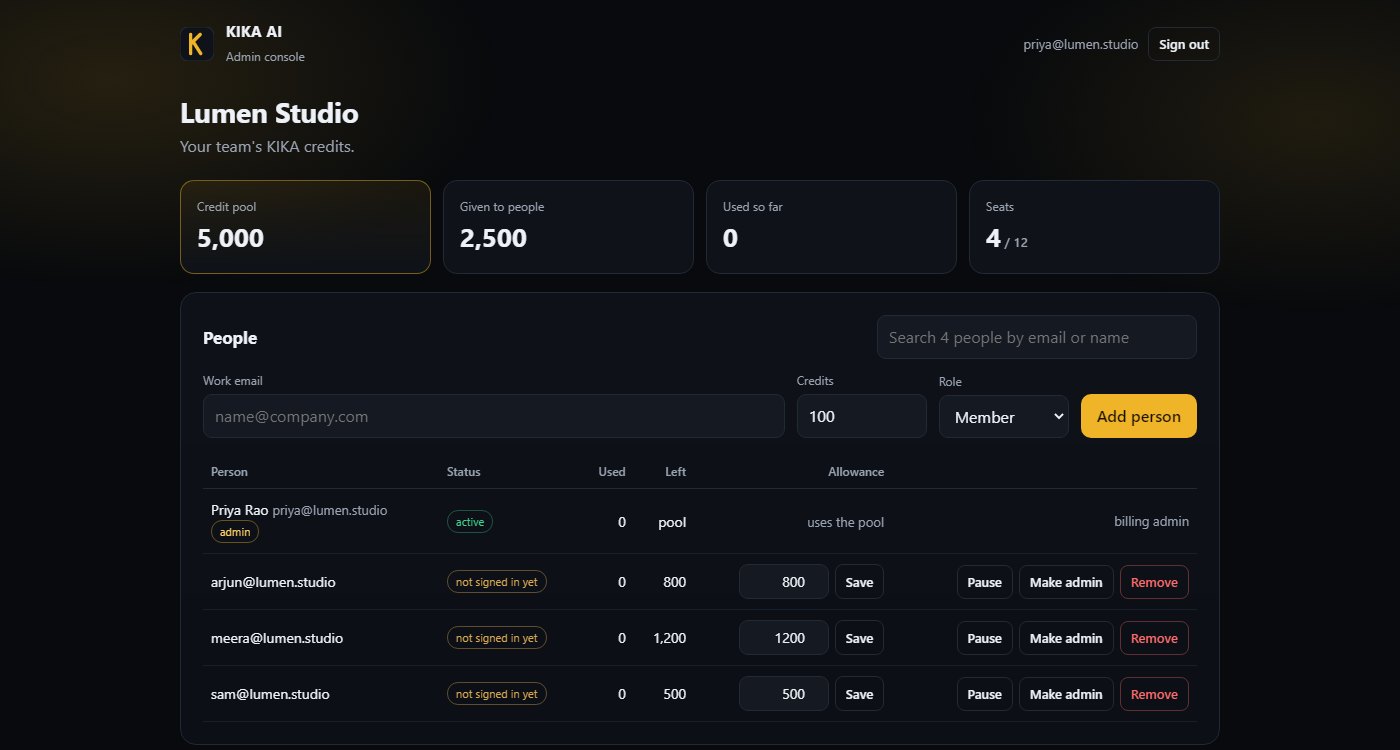
Same KIKA AI app. One admin pays, gives each person an allowance, and sees every credit spent — all from the admin console in the browser.

  • Employees just sign in with their work Google account
  • Raise, cut or pause anyone's allowance at any time
  • A ledger of every credit, ready for finance
KIKA AI · Admin console
The KIKA admin console for a sample company: a 5,000 credit pool, people with allowances and Pause, Make admin and Remove buttons.
Starter₹7,5001,000 credits · ₹7.50 each
Team₹35,0005,000 credits · ₹7.00 each
Business₹1,30,00020,000 credits · ₹6.50 each

Company credits don't expire. Need an invoice instead of a card? Ask from the admin console.

FAQ

Questions, answered.

Do I need to know how to code?

No. Describe what you want in plain English and KIKA writes it. Knowing some code helps you steer, but you don't need it to start.

Does my code leave my computer?

Your projects are saved only on your drive. To work on code the AI has to see it, so your prompt and the relevant parts of your project go through the KIKA cloud to the model you picked, for each request. KIKA stores none of it. Details in the privacy policy.

What does it need to run?

Windows 10 or 11 (64-bit), or a Mac with Apple Silicon (M1 or later), about 1 GB of free space and an internet connection.

Windows says it can't verify the publisher.

That's SmartScreen reacting to a new installer without a paid signing certificate. Choose More info → Run anyway. On a Mac, open it once from System Settings → Privacy & Security → Open Anyway.

How do employees join a company?

The admin adds their work email in the admin console. They install KIKA AI and sign in with that Google account — the company's credits unlock automatically. No codes, no separate app.

What happens when credits run out?

The free models keep working. Claude and Gemini Pro pause until you add credits on your account page — or your company admin tops up.

Build something tonight.

Free to download. Sign in with Google and start with the free models.

Windows 10 / 11 · 268 MB macOS Apple Silicon · 548 MB Version 0.1.0